A custom sound book is a printed book with an integrated electronic sound module, speaker, controls, power source, and mapped audio. To manufacture it reliably, the buyer and supplier must approve the printed artwork, page construction, button positions, audio files, module behavior, binding, labels, packaging, and inspection criteria as one controlled product.
Sound books appear straightforward: press a picture and hear a word, animal call, song, or story. In production, however, the printed and electronic systems are physically dependent. A button needs to align with the correct icon. The module needs space inside the page stack or side panel. The speaker needs a clear acoustic path. The binding must hold the product together without interfering with controls, wiring, or battery access.
This guide is written for children’s publishers, educational brands, museums, retailers, and sourcing teams preparing a custom sound book. It explains how to define the product, prepare audio and artwork, review samples, plan factory testing, and compare quotations. It avoids universal parameter claims because materials, dimensions, electronics, age grading, and market requirements should be confirmed for the exact project.
1. What is a sound book, and when is it the right format?
A sound book combines tactile print with immediate audio. A child presses an integrated button or marked area, and the book plays the assigned recording. Unlike a talking pen system, the reader does not need a separate handheld device. Unlike an insert-card player, the audio interface remains attached to a specific title.
The format is strongest when a limited number of well-chosen sounds makes the printed content more useful. Examples include animal calls, first words, pronunciation, short songs, musical instruments, vehicle sounds, counting prompts, museum interpretation, and brief narration. It is less efficient when the concept requires hundreds of activation points or an expanding library that should share one reusable device.
Questions that determine product fit
- Does each sound have a visible and understandable reason to be in the book?
- Can the intended user press the controls comfortably and identify the correct icon?
- Will the audio be short individual clips, longer tracks, or a sequence with navigation?
- Does the book need on/off, volume, stop, replay, mode, or language controls?
- Can the planned page construction, binding, and package support the electronics?
- Is the title a self-contained product, or should future content share a reusable platform?
Answering these questions early prevents a common mistake: forcing a manuscript into a sound-book structure after the artwork is finished. Audio prompts and physical buttons need visual space and narrative purpose. They should be part of the editorial and product-design process.
2. Define the book format before mapping the audio
Book format controls module space, button layout, handling, durability, shipping weight, retail presentation, and cost. Before requesting a detailed quotation, define the target trim size, orientation, page count, board or paper construction, binding style, module location, button panel, and intended age group.
Board book, paper book, or shaped construction
Board construction can provide a robust tactile format and space for integrated mechanisms, but thickness, page turning, edge finish, lamination, and binding must be coordinated. Paper-page formats may support different page counts and visual styles while still requiring a rigid module section. Shaped books and die-cut features can strengthen the concept but add tooling, artwork, assembly, and inspection considerations.
The supplier should explain the proposed construction rather than quote only paper names. Ask for a physical dummy that shows thickness, page sequence, panel dimensions, binding, module area, button positions, and the way a user holds the book. A blank dummy can answer structural questions before final color printing.
Choose the module position intentionally
Common concepts place the module in a side panel, top or bottom panel, or thickened back section. The correct position depends on button count, page layout, speaker, battery access, balance, book opening, packaging, and the intended hand position. A visually attractive panel may still make the book unstable or difficult to press on a soft surface.
Define controls separately from content buttons
Content buttons trigger sounds related to the page. Utility controls may handle power, volume, replay, stop, track navigation, or language. Mixing these roles without clear icons can confuse users. List every control, define its behavior, and identify whether it is intended for the child or caregiver.
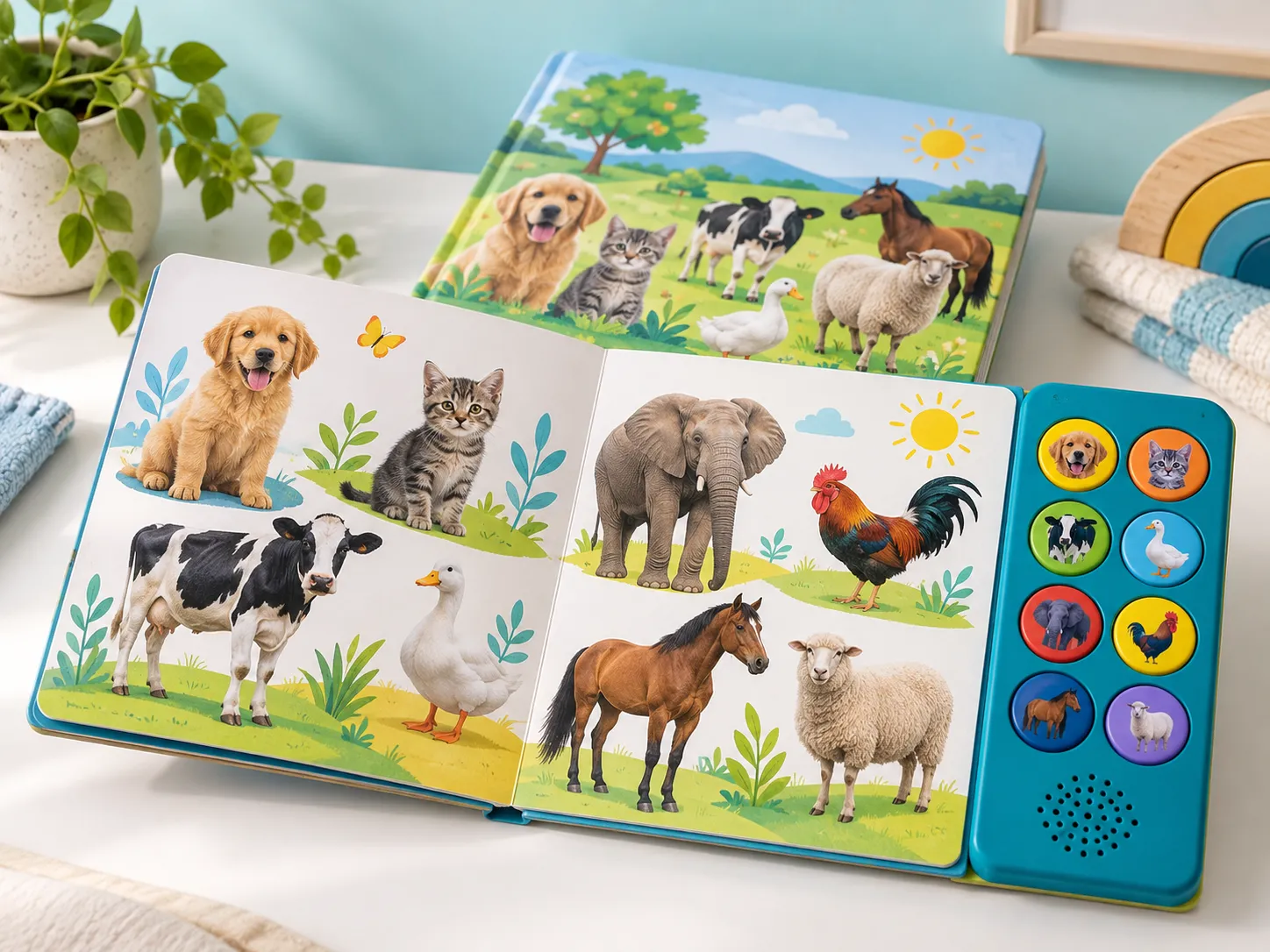
3. Build an audio map that production and inspection can follow
The audio map is the connection between editorial content and electronic behavior. It should identify every button, visible icon, audio filename, language, duration, function, and revision. A person outside the editorial team should be able to use the document to confirm why pressing a particular button plays a particular file.
Use a controlled naming system
File names should show title, button or sequence number, language, content type, and revision in a consistent pattern. Avoid informal names such as “lion-final-new.mp3.” Keep source recordings, edited masters, and production-ready files in defined folders. Record who approved each file and when.
Prepare audio for the final speaker, not studio headphones
Evaluate speech intelligibility and relative loudness through the intended module and book construction. Fabric, board, plastic, speaker openings, cavities, and table contact can change the sound. Normalize the listening experience across tracks so a quiet narration is not followed by an unexpectedly loud effect.
Check silence at the start and end, clipping, background noise, pronunciation, music rights, voice rights, language accuracy, and whether instructions match the visible interface. For multilingual books, define how language selection works and whether each button has corresponding tracks in every mode.
Specify playback rules
Should a second press restart, pause, stop, or do nothing? What happens when another button is pressed during playback? Does the book remember a mode after power-off? How does low power affect audio? These behaviors should be written, sampled, and tested. A list of filenames alone is not a functional specification.
| Map field | Example purpose | Production value |
|---|---|---|
| Button ID | Connects physical switch and printed icon | Supports assembly and function checks |
| Page / artwork reference | Shows where the prompt appears | Prevents icon-to-button mismatch |
| Filename and revision | Identifies the approved production track | Reduces wrong or obsolete audio loading |
| Language / mode | Defines which version plays in each state | Supports multilingual testing |
| Duration | Helps estimate capacity and interaction timing | Reveals missing or unexpectedly long files |
| Approval status | Shows owner and release date | Prevents draft content from entering production |
Need a sound-book requirement checklist?
Share the page plan, button count, representative artwork and audio, target market, quantity range, and launch timing.
4. Prepare artwork around dielines, buttons, and binding
Artwork preparation is not only a printing task. The files must account for the module footprint, physical button centers, speaker opening, trim, bleed, safe areas, folds, page sequence, board wrapping, binding, labels, and any battery or switch access. Obtain the current production dielines before final layout.
Keep prompts visually connected to their buttons
A child should be able to predict which button relates to the page. Use clear icons, consistent ordering, and enough visual separation. If a side panel remains visible across spreads, confirm how readers understand which sounds belong to which page. If the buttons change function by mode, instructions and mode indicators must be clear.
Protect critical artwork
Faces, text, logos, small icons, and button prompts should remain inside agreed safe areas and away from binding or structural transitions. A design may look correct in a flat PDF but shift visually after board wrapping, lamination, die cutting, or binding. Review imposed proofs and physical dummies, not only single pages on screen.
Use one controlled source of truth
Record the final artwork filename, revision, color references, dieline version, page sequence, and approval. If the button map changes, check both artwork and audio. If the module dimensions change, check dielines, page stack, packaging, and carton fit. Installation preparation should include the released files needed by printing, electronics programming, assembly, and inspection.
5. Engineer the electronic module and book as one assembly
The electronic design may include a printed circuit board, switches, speaker, wiring, battery system, power control, volume, memory, enclosure or support structure, and firmware. Buyers do not need to design every circuit, but they should define observable behavior and understand which components are critical to the approved product.
Button feel and alignment
Button force should suit the intended user and remain consistent across the panel. Test presses near the center and realistic angles. Review whether the printed overlay, board layers, plastic parts, switch height, and assembly tolerance maintain reliable activation. A sample made by hand may need additional confirmation before mass production.
Speaker clarity and acoustic path
The speaker opening and internal cavity affect clarity and unwanted vibration. Test the book on a table, held in the hands, and in likely reading positions. Listen for rattle, distortion, interruption, and large differences between tracks. Define expected volume behavior instead of relying on “loud enough.”
Battery access and transport
Power choice affects enclosure, user instructions, package design, weight, testing, and logistics. Confirm whether batteries are installed, included separately, or excluded; whether a pull tab is used; how the compartment is secured; and what labels or documents are required. Rechargeable configurations add charging-interface and transport considerations.
If lithium batteries are used, discuss transport testing and documentation with the battery supplier, freight partner, and compliance adviser. The final responsibilities depend on configuration and shipping route. Do not assume that a generic battery declaration covers every packed product and mode of transport.
6. Use staged samples to approve structure, content, and production
A sound book often benefits from staged approval because print, mechanics, electronics, and audio mature at different speeds. The buyer should label each sample by purpose and record deviations so a visually polished mock-up is not mistaken for the final production basis.
- Structural dummy: confirms trim size, page stack, binding, module location, panel proportions, handling, and packaging concept without requiring final print or audio.
- Functional prototype: confirms button behavior, representative audio, speaker, controls, power, and the physical relationship between module and book.
- Color and artwork proof: reviews imposed pages, color expectations, button icons, labels, and finishing against approved files.
- Integrated approval sample: combines production-intent structure, print, audio, electronics, controls, labels, and early pack-out.
- Production confirmation: checks that released files, materials, components, work instructions, and inspection criteria are present at the manufacturing stage.
Use written feedback with photographs and identifiers. “Move the button slightly” is ambiguous; reference the dieline coordinate or annotated drawing and confirm the related artwork and switch position. “Improve sound” should become a specific issue such as rattle on named tracks, low narration clarity, or inconsistent volume.
Freeze the production basis after approval. Further changes should be recorded, reviewed for effects on print, electronics, packaging, schedule, cost, and compliance evidence, and approved by the responsible parties.
7. What should sound book factory testing cover?
Sound book quality control must verify both the book and the electronic experience. A book can be printed beautifully but play the wrong audio; a module can pass a bench test but be installed under the wrong icon. The inspection plan should connect controlled files and the approved sample to observable checks.
Incoming and pre-production checks
- Confirm approved paper or board, print references, lamination or finish, module parts, switches, speakers, batteries, labels, and packaging.
- Verify the released artwork, audio library, firmware, button map, dielines, page sequence, and pack-out specification.
- Prepare work instructions for module installation, wiring or fastening, button alignment, speaker position, binding, and final packing.
- Define defect categories, reference samples, sampling methods, reaction plans, and release authority.
In-process controls
Check print and finishing before full assembly, because reworking completed books is expensive. Verify module programming and representative functions before installation. During assembly, control alignment, fastening, page stack, binding, speaker path, battery access, and any adhesive or structural operations that affect function.
Final function and appearance testing
Test startup, every defined control, sampled or complete content buttons according to the agreed method, correct language, volume behavior, sound clarity, interruptions, shutdown, and power. Inspect page sequence, color and print defects, binding, edges, surface finish, button icons, module fit, labels, and cleanliness.
Shipment inspection
Inspect goods when retail packaging is sufficiently complete. Select random cartons, verify model and language, test content from different parts of the map, confirm accessories and instructions, review package protection, check carton quantities and marks, and reconcile the result with the purchase order. Leave time for corrective action and reinspection before shipment.

Plan compliance around the final product
Requirements depend on intended use, age, construction, materials, electronics, battery, sound, accessories, claims, and destination market. For U.S. children’s products, start with the official CPSC toy safety guidance. For the European Union, consult the current European Commission toy safety information. Electrical functions may also fall within the scope described by IEC 62115.
Ask an accredited laboratory or qualified adviser to confirm the plan. Review whether existing reports match the exact module, battery, materials, construction, age grading, labels, and standard edition. Treat certifications as configuration-specific evidence, not transferable marketing badges.
8. How to compare sound book quotations, MOQ, and lead time
A comparable quotation should separate development, samples, print preparation, tooling or dies, electronic module, audio programming, book printing and binding, finishing, labels, packaging, testing, inspection, and shipping terms. Ask what is included, excluded, temporary, or based on buyer-supplied files.
| Quotation item | Clarify | Common mismatch |
|---|---|---|
| Book construction | Size, pages, board or paper, binding, finish, shape | Different construction quoted under the same page count |
| Sound module | Buttons, controls, speaker, power, memory, enclosure | Prototype module differs from production quotation |
| Audio work | File preparation, mapping, loading, revisions, languages | Buyer assumes editing or recording is included |
| Artwork and tooling | Dielines, prepress, proofs, dies, molds, ownership | One-time costs appear after sample approval |
| Quality and testing | Inspection stages, test scope, reports, third parties | “QC” is listed without defined deliverables |
| Packaging | Wrap, box, tray, labels, inserts, carton standard | Generic protective pack quoted instead of retail pack |
MOQ is influenced by printing economics, custom components, packaging, audio programming, tooling, and material purchases. Ask which features or materials create the MOQ and what changes at different quantity ranges. A lower quantity may be possible with a different construction or standard platform, but the trade-offs should be explicit.
Lead time should be shown as a sequence: requirement review, structure and dielines, audio and artwork preparation, prototype, revision, integrated approval, compliance samples, material preparation, printing, module programming, assembly, factory testing, shipment inspection, and dispatch. Buyer approvals and late files are part of the critical path.
Supplier questions before placing an order
- Which parts of the book and module are made or coordinated by your team?
- What inputs are required before a firm quotation and production schedule?
- How are artwork, dielines, audio, firmware, and button maps version controlled?
- What is the purpose and production representativeness of each sample?
- How are button alignment, audio mapping, print, binding, and pack-out checked?
- Which reports cover the exact final configuration and destination market?
- How are changes to paper, board, inks, adhesives, module components, battery, or packaging controlled?
- What happens when final inspection identifies a functional or packaging issue?
9. Frequently asked questions
What is needed to get a custom sound book quotation?
Provide the target market and age, trim size, page count, construction, button count, approximate audio duration, artwork status, power concept, packaging, quantity range, and launch timing. Representative artwork and audio make the first review more accurate, even when final files are still in development.
Can existing book artwork be converted into a sound book?
Often yes, but the files usually need review against the button panel, module footprint, binding, dielines, bleed, safe areas, labels, and page sequence. The original layout may need adjustment to create clear prompts, accommodate structural elements, and protect critical artwork.
How many sounds can a sound book include?
The practical count depends on the module, button layout, book size, audio duration, navigation design, power, target cost, and user experience. More buttons are not automatically better. Each sound should have a clear purpose, visible trigger, understandable response, and reliable inspection method.
When should final compliance testing happen?
Testing strategy should be planned early, while final testing or certification samples should represent the production configuration closely enough for the evidence to remain applicable. Confirm timing, sample quantity, documentation, and change-control expectations with the laboratory or compliance adviser.
Conclusion: release one controlled print-and-audio product
A sound book is successful when the editorial concept, printed structure, audio, buttons, speaker, power, binding, labels, and packaging reinforce one another. The buyer should not approve those elements as isolated pieces and hope they align during mass production.
Define the format before final artwork, build a traceable audio map, test representative content through the intended module, use staged samples, control production files, and inspect both function and print quality. When the project is managed as one integrated product, supplier quotations become more comparable, approvals become clearer, and shipment inspection confirms agreed work instead of discovering preventable mismatches.
Preparing a sound book for supplier quotation?
Send the trim size, page plan, button count, representative artwork, audio scope, market, quantity range, packaging, and timing. We’ll help organize the production questions.